Backtest Lab Docs
State Timeout
In some trading strategies, a particular market signal may remain relevant only for a limited period. If the expected confirmation does not arrive within that period, the original signal may no longer be useful.
State Timeout allows you to limit how long a strategy can remain in a particular state before automatically returning to the Start State.
This is particularly useful for strategies where a trading setup must be confirmed within a specific time window.
How State Timeout Works
When a strategy enters a state with a timeout configured, Backtest Lab begins tracking how long the strategy has remained in that state.
Two outcomes are possible:
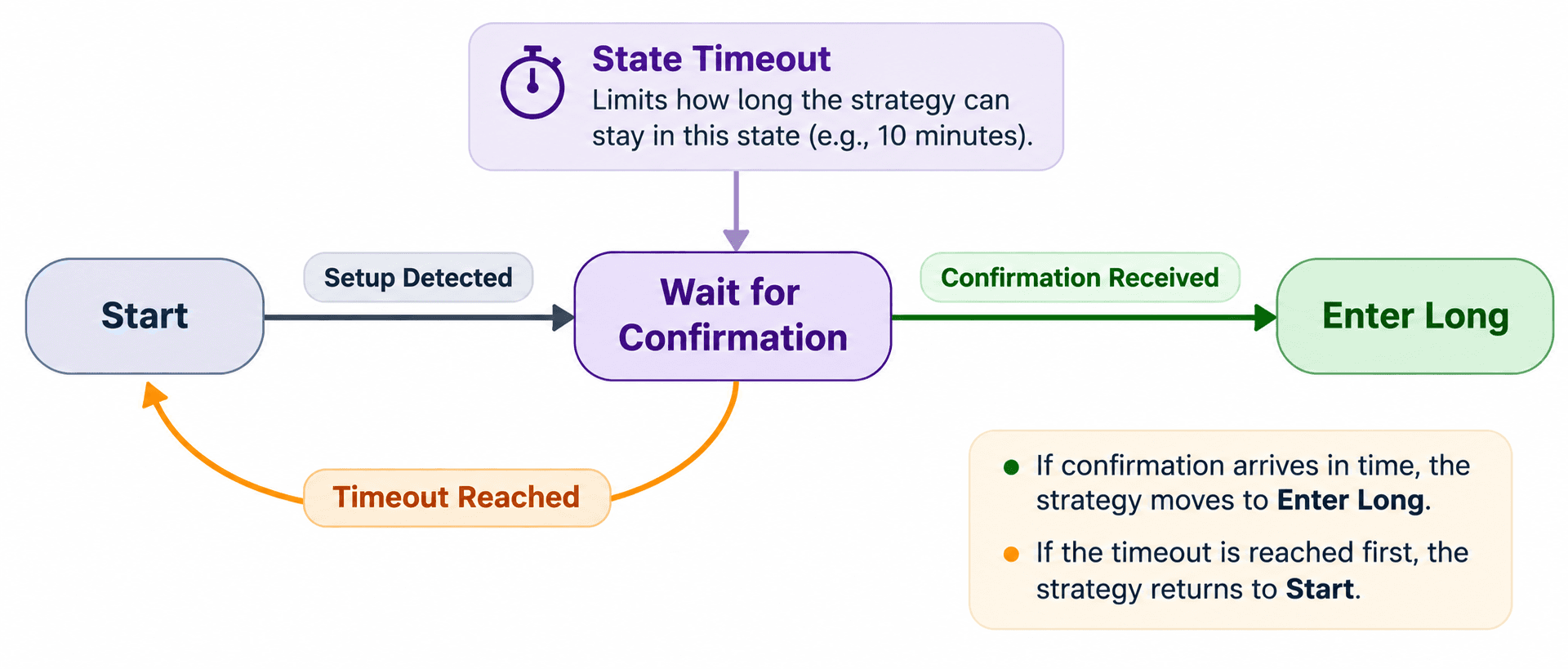
- A transition condition is satisfied before the timeout: The strategy follows the corresponding transition and moves to the connected state.
- The timeout is reached without a transition: The strategy automatically returns to the Start State, abandoning the current setup.
This prevents the strategy from waiting indefinitely for a condition that may no longer be relevant.
Example: Confirming a Volatility Signal
Consider a strategy that looks for a sharp increase in market volatility, followed by a confirmation signal before entering a trade.
When high volatility is detected, the strategy moves from the Start State into a Wait for Confirmation state.
However, a confirmation arriving much later may no longer be relevant to the original volatility event.
By configuring a timeout, the strategy can limit how long it waits for confirmation.
If confirmation arrives within the permitted period, the strategy proceeds to the next state. Otherwise, the timeout causes the strategy to return to the Start State and begin looking for a new volatility signal.
This makes it possible to enforce a validity period for a trading setup without explicitly creating a separate timeout condition and transition.
For more information about how the strategy evaluates conditions while a state is active, see Condition Priority.